Learning to find the smaller groups
Use outlined groups as practice for seeing manageable parts and combining them into a larger number.
Updated October 7, 2026Open the game ↗Why grouping mode exists
Layouts, grouping outlines, and Finger Aid are training cues. They make useful structure visible while the child learns to recognize amounts and combine parts. The central teaching idea is two groups, with five and the remainder as the main pattern for totals above five.
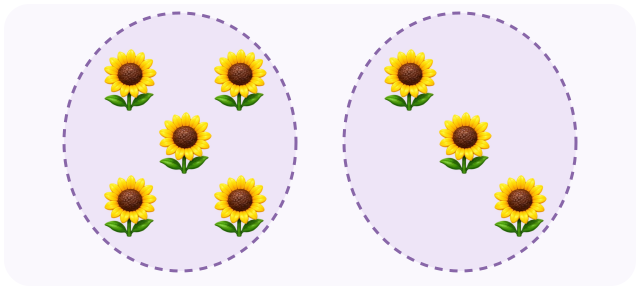
Teaching illustration of the intended five-and-the-rest approach. The outlines demonstrate support; see the current mode differences below.
Five can become a familiar pattern with practice. Counting and recognizing smaller parts within it are welcome during training. After support, invite the child to use the structure without the cue.
Set up a first grouping activity
Open grouping and set up a first round
Choose a numbered step, or use Next. Tap any screenshot to enlarge.
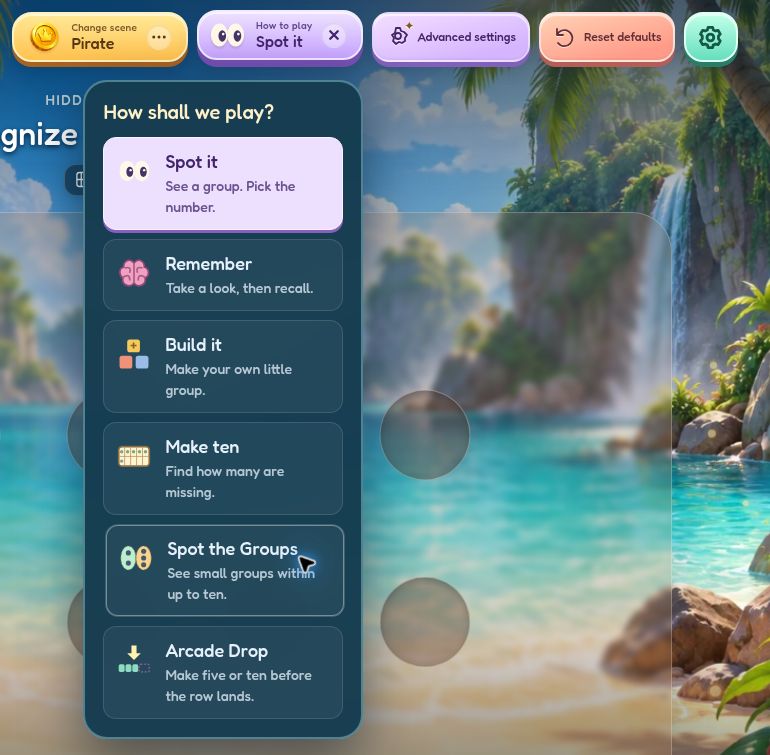
Choose the mode
Open the purple How to play dropdown at the top of the game, then select Spot the Groups. Choose the mode before changing settings: switching modes restores its defaults.
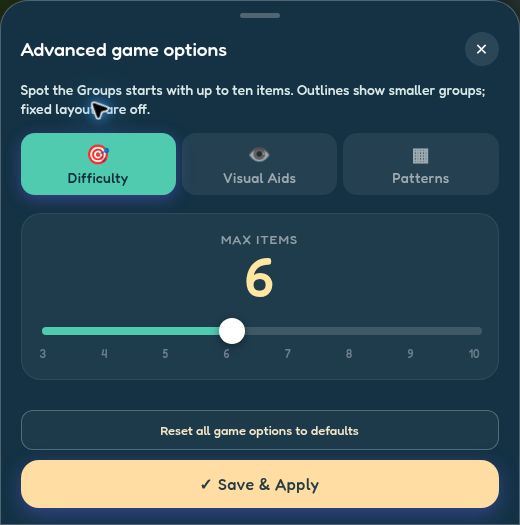
Set the maximum
Open Advanced settings, answer the maths checkpoint, and select Open settings. In Difficulty, set Max Items to 6.
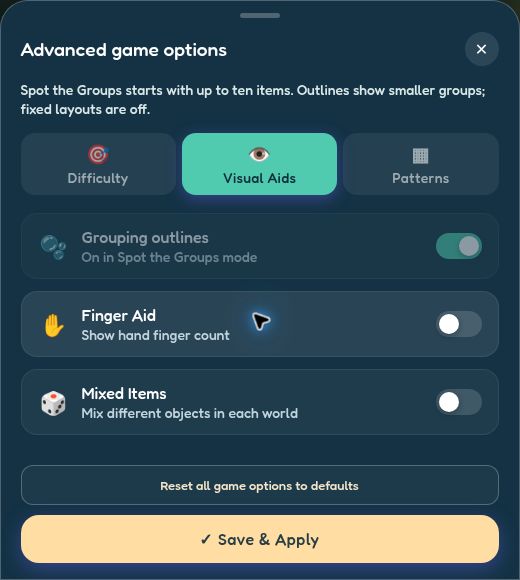
Check the aids
Choose Visual Aids. Leave Finger Aid and Mixed Items off for this first activity. Grouping outlines are automatically on. Select Save & Apply to return to the game.
| Where to go | What to choose |
|---|---|
| How to play | Spot the Groups |
| Advanced settings → Difficulty | Max Items: 6 |
| Advanced settings → Visual Aids | Grouping outlines: on automatically; Finger Aid: off; Mixed Items: off |
| Advanced settings → Patterns | Layout Mode: off automatically |
| Finish | Save & Apply |
Need help opening the panel? See the settings checkpoint walkthrough.
A short conversation around one round
- Let your child look before offering a strategy.
- Ask “What groups do you see?” Let them point or explain.
- Ask “How many are in each group?” Count together if needed.
- Ask “How many objects altogether?” Help connect the parts to the total.
- After they answer, ask “How did you work it out?” Keep the conversation short.
If the child says “two” when there are two outlined groups, clarify: “Yes, two groups. How many flowers are inside both groups?” Both the number of groups and the number of objects are worth noticing.
Which groups the game actually shows
There is a current difference between the two displays. Dice Style already uses five and the remainder for totals six through ten. Spot the Groups currently uses the outlined combinations below, including an older three-part split for nine. The teaching examples above show the intended two-part approach; they are not a promise of the exact next grouping round.
| Total | Outlined parts |
|---|---|
| 2 | 1 + 1 |
| 3 | 1 + 2 |
| 4 | 2 + 2 |
| 5 | 2 + 3 |
| 6 | 3 + 3 |
| 7 | 3 + 4 |
| 8 | 4 + 4 |
| 9 | 3 + 3 + 3 |
| 10 | 5 + 5 |
These are the current outlined-mode combinations. Positions vary, but the game does not cycle through every partition of a total. One object stands alone. Five may be recognized as a familiar pattern or worked out from smaller parts; do not expect every child to recognize a five at a glance.
Move toward the child’s own groups
After training with cues, use Build it to observe whether the child creates two useful groups independently. For eight, look for a recognizable five and three more. Wait before suggesting a structure; ask the child to explain what they made.
For an independent recognition check, choose Spot it and turn both Finger Aid and Layout Mode off in Advanced settings. Dice Style and the other supplied layouts remain training supports, even when fingers are hidden. Layout Mode off gives a freer scatter: the child can find possible groups, but cannot drag displayed objects.
Outlines are fixed on in Spot the Groups, so switch modes for the independent check. Away from the screen, use eight large, child-safe counters and ask the child to make the quantity easy to recognize. Record whether the structure was chosen, copied, or prompted.
From training to assessment
The purpose changes when the support changes. Layouts, fingers, and grouping outlines are all training supports. Spot it with Layout Mode or Finger Aid on is supported practice; turn both off when you want to check recognition independently.
| Purpose | Exact setup | What to do |
|---|---|---|
| Train with layouts | How to play → Spot it → Advanced settings → Patterns → Layout Mode on → Save & Apply → Layouts → Dice Style or Ten-Frame | Discuss the supplied arrangement and the parts it makes visible. Finger Aid can stay off to focus on the layout alone. |
| Train with fingers | How to play → Spot it → Advanced settings → Visual Aids → Finger Aid on → Save & Apply | Connect the displayed fingers with the objects. Talk through five and the remainder when the quantity exceeds five. |
| Train with outlines | How to play → Spot the Groups; outlines are on automatically. Finger Aid can also be enabled in Visual Aids. | Name the supplied parts and combine them. Check the current partition table above for what this mode displays. |
| Check recognition | How to play → Spot it → Advanced settings → Visual Aids → Finger Aid off → Patterns → Layout Mode off → Save & Apply | Let the child choose the amount first, then ask how they saw it. Grouping outlines are off automatically. |
| Check missing parts | How to play → Arcade Drop → Make 5 or Make 10 → Practice → Let’s drop! | Let the child choose what completes the row. Practice avoids a deadline; Arcade adds time pressure. |
| Check construction | How to play → Build it; keep its fixed settings | Observe the first arrangement and hear the child’s explanation before Check. Do they create a five and the remainder themselves? |
During an independent attempt, avoid pointing to the right answer or supplying a grouping. If help is needed, return to training and try an unprompted task later. Change modes before adjusting settings, because mode changes restore their defaults.
These modes provide opportunities for informal assessment. A correct click, a fast answer, or a named shape alone cannot tell you how the child reasoned.
What to notice over time
Watch whether your child begins naming parts without recounting every object, combines them with an explanation, or chooses a grouping in a new arrangement. Note whether the idea was spontaneous, copied, or suggested by you. Revisit it another day with different objects.
These observations can guide your next conversation. They are not a score, diagnosis, or proof of transfer. See what Build it can and cannot tell you.