Play Arcade Drop at your own pace
Make five or ten, choose Practice or Arcade, and understand when a run ends.
Updated October 7, 2026Open the game ↗Choose the target and pace
From the mode menu to Arcade Drop
Choose a numbered step, or use Next. Tap any screenshot to enlarge.
Choose Arcade Drop
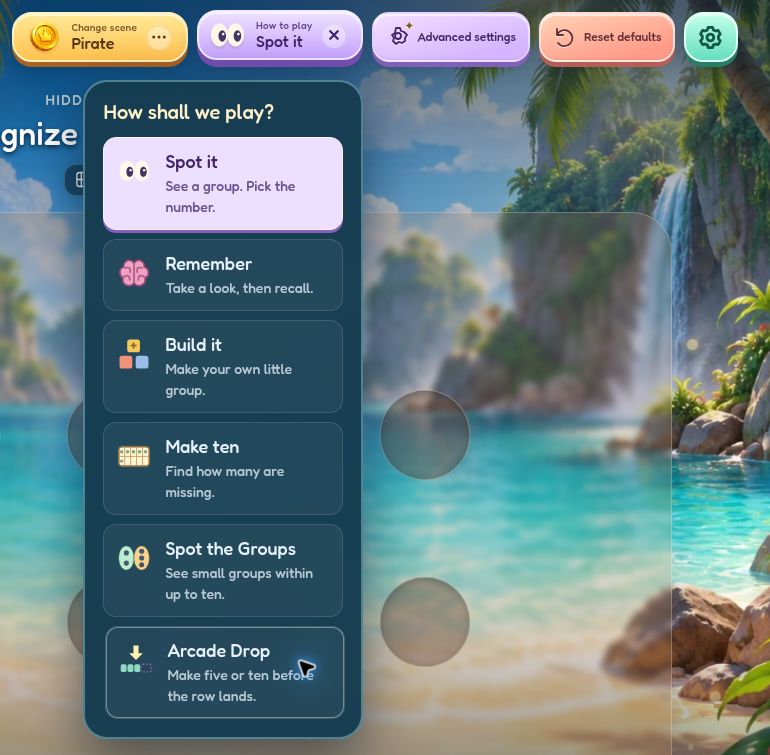
After Let’s explore!, open the purple How to play dropdown in the top toolbar. Select Arcade Drop at the bottom of the menu.
Choose target and pace
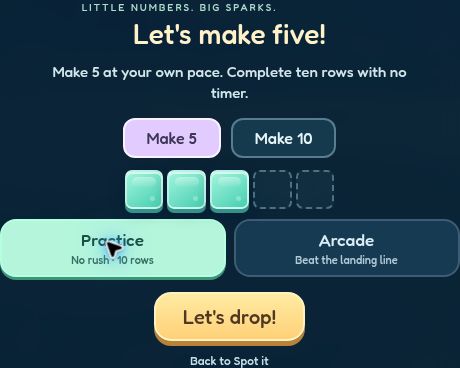
On the starting card, choose Make 5 or Make 10. Select Practice for ten rows with no deadline, or Arcade for a time challenge. Select Let’s drop! to begin.
On a small screen, tap the current mode’s picture to open How to play if the words are hidden.
Find the missing part
Look at the filled part of the row. Choose how many more pieces complete the target.
For a target of five, three filled spaces need two more. Ask “What goes with three to make five?”
A wrong answer does not clear the row. In timed Arcade, the row continues to fall.
When a run ends
A run finishes after ten completed rows. In timed Arcade, the first row that reaches the bottom also ends the run.
The game shows the missing number after a missed deadline. Select Play again to start another run.
Use the pause control for a break. Opening the settings checkpoint pauses an active drop. Select Keep playing to continue afterward.
Keep the purpose in view
Arcade Drop is intended to check missing-part knowledge after training. Let the child choose the number that completes five or ten before you offer help. Then ask how they knew.
Practice removes the deadline so you can focus on the child’s answer and explanation. Arcade adds a time challenge. If you demonstrate a pair or work it out together, use that round as training and revisit an unprompted attempt later.
Game feedback tells you whether the answer was correct. It does not, by itself, show the strategy used or establish mastery. Compare observations across quantities and occasions. See training cues and independent checks.